바이오에 링크 하나.
패키지, 가격, 사업자 정보.
바이오 페이지는 당신이 제공하는 것과 가격을 보여주고, 브랜드 계정 없이 협업 요청을 받습니다. 사업자 정보, 미디어킷, 상점 카드는 처음부터 내장돼 있습니다.
링크 목록 그 이상.
link-in-bio 페이지는 링크를 모읍니다. creatordeal의 당신 페이지는 추가로 주문을 받고, 가격을 보여주고, 사업자 정보를 담습니다.
유럽의 사업자 정보 의무 — 별도 탭으로
유럽에서 정기적으로 유료 협업을 하는 사람에게는 보통 사업자 정보가 필요합니다. 바이오 페이지에는 전용 카드가 있습니다: 개인 또는 회사로 한 번 입력하면 항상 링크 아래에 표시됩니다. 자국에서 필요한 항목은 의문이 들면 법률 상담으로 확인하세요 — 우리는 자리를 제공할 뿐, 법률 상담은 아닙니다.
협업 요청 받기 — 브랜드 계정 없이
각 패키지 아래에 요청 버튼이 있습니다. 브랜드는 브리프를 쓰고 날짜와 사용권을 지정해 보냅니다 — 사전 등록 없이. 이메일로 magic link를 받고 비밀번호 없이 답합니다. 당신은 크리에이터 영역에서 요청을 확인하고 수락하거나 거절합니다.
패키지, 가격, 레이트 카드를 한곳에
"가격 문의" 대신 당신의 페이지에는 릴스, 쇼츠, TikTok 영상, 촬영의 가격이 적혀 있습니다. 가격은 직접 정하며, 패키지마다 자유롭게 바꿀 수 있는 시장 가격을 제안합니다. 가격을 공개하고 싶지 않으면 스위치로 숨기세요 — 요청은 계속 가능합니다.
숍 탭: 자체 상품, 제휴 링크와 파트너 링크
상점 카드에는 당신의 링크가 있습니다: 장비용 Amazon 제휴 링크, 굿즈, 할인 코드, 뉴스레터. 각 항목에는 이미지, 제목, 쿠폰 코드가 있습니다. 클릭은 리디렉션을 거치므로 실제로 무엇이 클릭되는지 알 수 있습니다.
PDF 첨부 없는 미디어 키트
채널별 도달 범위, 참여율, 상위 국가, 오디언스의 연령과 성별, 작업 예시, 완료 주문의 평가 — 같은 페이지에 모두. 링크가 브랜드마다 따로 보내야 했을 PDF 미디어킷을 대신하며, 항상 최신입니다.
선작업 대신 결제 보호
바이오 페이지를 통해 예약이 성사되면 브랜드는 creatordeal에 선결제합니다. 납품하고 브랜드가 승인할 때까지 자금은 그곳에 있고, 그 후 지급이 당신에게 갑니다. 청구서는 쓰지 않습니다: 지급마다 모든 항목이 담긴 크레디트 노트가 붙습니다.
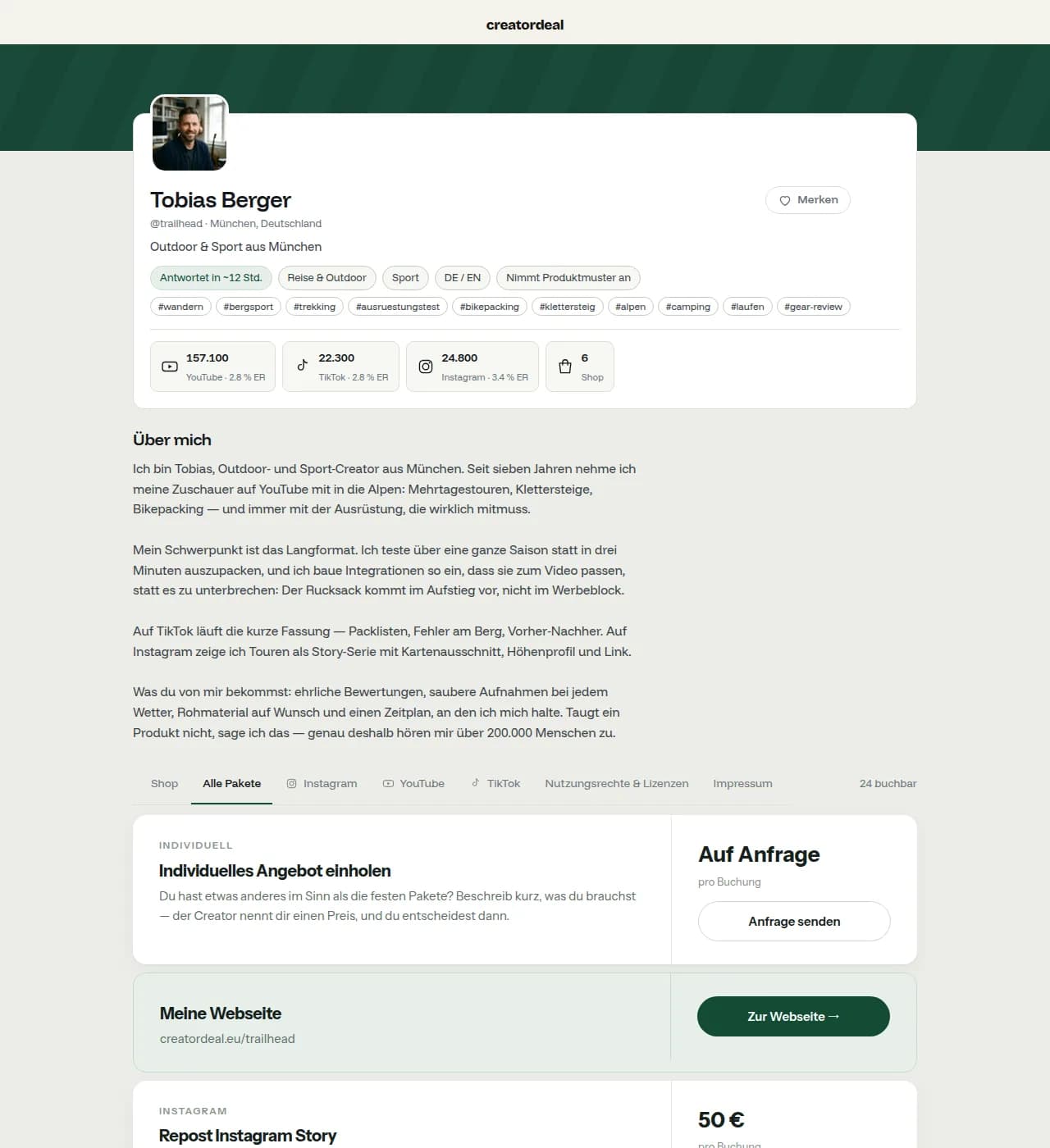
완성된 바이오 페이지는 이렇게 보입니다.
creatordeal의 실제 크리에이터 페이지: 프로필 사진, 채널, 도달 범위, 가격이 있는 패키지, 오디언스 — 그리고 상점 카드와 사업자 정보.
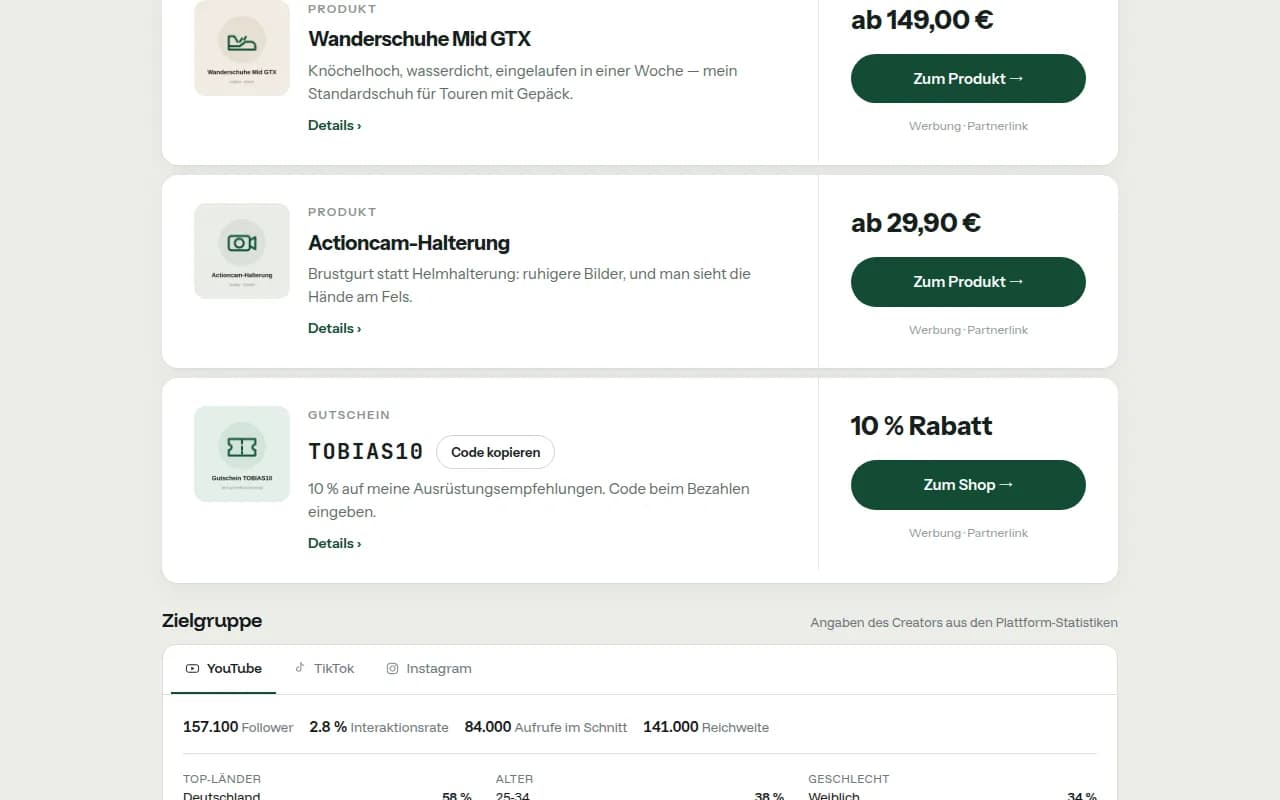
자체 상품, 파트너 링크, 할인 코드.
상점 카드에는 당신의 추천이 담깁니다: 이미지와 가격이 있는 제품, 제휴 링크, 복사용 할인 코드. 유료 링크는 모두 광고로 표시됩니다.
Free와 Pro.
바이오 페이지는 무료입니다 — 사업자 정보, 패키지, 문의, 채팅, 결제 포함. Pro는 바이오 링크가 사업이 된 분들을 위한 요금제입니다.
| 기능 | Free (0 €) | Pro (월 39.90 € 또는 연 399 €) |
|---|---|---|
| 바이오 페이지, 사업자 정보, 패키지, 문의, 채팅, 결제 | 가능 | 가능 |
| 숍 탭 항목 | 최대 15개 | 무제한 |
| 클릭 통계 | 7일 및 전체 | 90일, 일별, 항목별, 유입 경로 포함 |
| 디자인 | 기본 | 나만의 강조 색상, 배경 이미지, 블록 순서 |
| 인쇄용 QR 코드 | — | 가능 |
| 기간 지정 항목 (표시 시작–종료) | — | 가능 |
| 내 링크의 판매 수수료 | 0 % | 0 % |
그 사이에 Standard(월 7.90 € 또는 연 79 €)가 있어 최대 200개 항목, 30일 통계, 나만의 디자인을 제공하고, 그 위에 Premium(월 199 € 또는 연 1,990 €)이 있습니다. 모든 가격은 VAT 별도입니다. 요금제는 크리에이터 영역에서 월간 또는 연간으로 예약하며 Stripe에서 언제든 해지할 수 있습니다. 다른 크리에이터의 링크나 코드로 가입하면 Pro를 3개월간 무료로 사용합니다. 입력한 항목은 언제나 저장됩니다 — Free는 표시되는 개수만 적을 뿐입니다.
creatordeal과 기존 링크인바이오 도구.
Linktree 대안을 찾는 사람은 대개 둘 중 하나를 찾습니다: 더 예쁜 링크 목록, 아니면 주문이 들어오는 페이지. 후자가 우리의 목표입니다. 순수한 링크 목록에는 Linktree나 Beacons 같은 유명 도구가 아주 좋습니다. 표가 그 차이를 보여줍니다.
| 항목 | creatordeal | 기존 링크인바이오 도구 |
|---|---|---|
| 링크 목록, 이미지, 색상 | 있음 | 있음, 보통 디자인 자유도가 더 높음 |
| 무료로 사용 가능 | 있음, Free는 구독 없이 – 요금제는 선택 | 대개 무료 등급, 추가 기능은 구독 |
| 고정 가격 패키지 | 있음, 가격은 직접 설정 | 지원하지 않음 |
| 브리핑이 있는 협업 요청 | 있음, 브랜드 계정 없이 | 문의 양식이나 이메일로 |
| 예약과 결제 | 선결제, 승인 후 정산 | 지원하지 않음 |
| 별도 탭으로 제공되는 사업자 정보 | 있음, 미리 준비됨 | 직접 추가한 링크로 가능 |
| 도달 범위와 오디언스를 미디어 키트로 | 있음, 같은 페이지에 | 파일이나 별도 링크로 |
| 할인 코드가 있는 제휴·파트너 링크 | 있음, 숍 탭 안에 | 일반 링크로 |
| 브랜드에게 발견되기 | 있음, 크리에이터 검색을 통해 | 지원하지 않음 |
오른쪽 열은 link-in-bio 도구들이 보통 제공하는 것을 설명한 것으로, 특정 제품에 대한 판단이 아닙니다. 특정 업체가 오늘 무엇을 할 수 있는지는 그 업체 페이지에 적혀 있습니다. 둘은 배타적이지도 않습니다: 많은 크리에이터가 링크 목록을 유지하고 그 옆에 creatordeal 링크를 둡니다. 예약이 거기서 오기 때문입니다.
링크인바이오에 대한 자주 묻는 질문.
짧게 답했습니다. 여기 없는 것은 크리에이터 영역의 지원팀이 답합니다.
바이오 페이지 이용료는 얼마인가요?
없습니다. 프로필, 바이오 페이지, 패키지, 상점 탭은 무료이며 기본 요금도 의무 구독도 없습니다. 더 많은 항목과 통계를 제공하는 요금제는 선택 사항입니다. 플랫폼을 통해 예약이 결제될 때만 지급액에서 커미션을 뗍니다. 요율은 가격 페이지와 모든 지급명세서에 있습니다.
제 주소는 무엇이고 바꿀 수 있나요?
당신의 페이지는 creatordeal.eu와 핸들 — 등록 시 고르는 이름 — 아래에 있습니다. Instagram, TikTok, YouTube 바이오에 둡니다. 이름이 비어 있는 한 크리에이터 영역에서 바꿀 수 있습니다.
인플루언서에게 사업자 정보가 필요한가요?
유럽에서는 보통 정기적으로 유료 홍보·판매를 하는 사람에게 사업자 정보가 필요합니다. 자국에서 정확히 무엇이 들어가는지는 다릅니다 — 바이오 페이지에는 개인 또는 회사로 채우는 전용 카드가 준비되어 있습니다. 이는 법률 상담이 아닙니다.
브랜드가 저에게 요청하려면 계정을 만들어야 하나요?
아니요. 바이오 페이지를 통한 요청은 등록 없이 진행됩니다. 브랜드는 일회용 magic link를 이메일로 받아 비밀번호 설정 없이 질문에 답합니다. 계정은 예약할 때 비로소 생성됩니다.
가격을 숨길 수 있나요?
네. 스위치로 고정 가격을 숨길 수 있습니다. 패키지는 계속 보이고 요청도 작동합니다. 가격을 공개하면 경험상 진지한 요청이 늘지만, 결정은 당신의 몫입니다.
아마존 등 제휴 링크를 넣을 수 있나요?
네, 상점 카드에서요. 각 항목에는 이미지, 제목, 대상 링크, 원하면 쿠폰 코드가 있습니다. 링크에 광고 표시가 필요한지는 자국과 플랫폼 규칙에 따라 다르며, 판단은 당신에게 있습니다.
이 페이지가 미디어 키트를 대신하나요?
대부분의 요청에는 충분합니다: 도달 범위, 참여율, 오디언스, 작업 예시, 가격이 같은 페이지에 있고 항상 최신입니다. PDF를 추가로 보내도 되지만 필수는 아닙니다.
기존 링크 목록과 creatordeal을 함께 쓸 수 있나요?
네. 많은 크리에이터가 기존 링크 목록을 유지하고 creatordeal 링크를 "협업과 가격" 항목으로 둡니다. 예약까지 클릭 하나가 더 늘지만, 똑같이 작동합니다.